
PSunStudio
A CapCut-style video editor for Mac — multi-camera footage sorting, Thai AI captions, and CapCut projects in and out

About the app
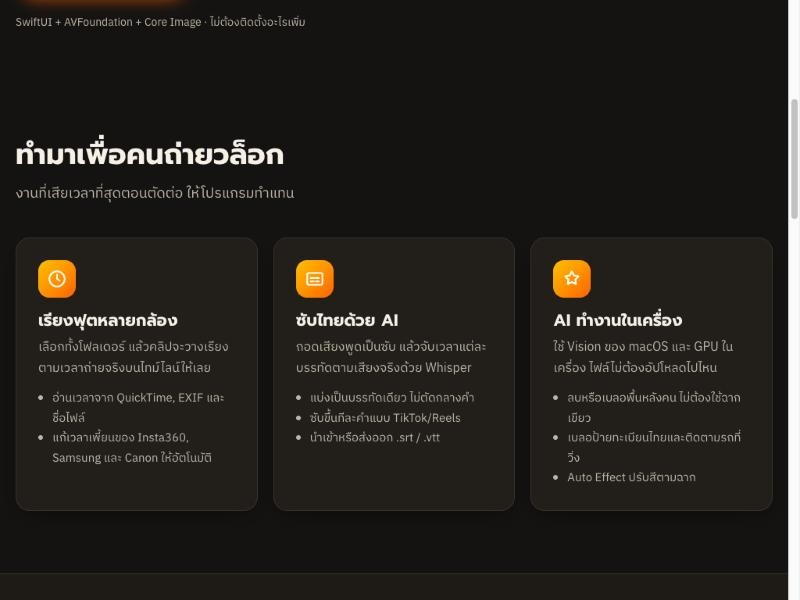
A native macOS video editor that works like CapCut, built for vloggers. Pick a whole folder of footage from several cameras and the clips land on the timeline in the order they were shot. Make Thai captions with AI, timed to the actual speech, remove or blur the background behind people, and blur licence plates automatically. Open a CapCut project, keep editing, and send it back as a new draft without touching the original. A built-in Claude assistant takes editing instructions in plain Thai, and the other AI features run on your Mac, so your footage never has to be uploaded. Early preview (v0.1) for macOS 14 and later.
Features
- Sorts footage from several cameras by recording time, reading QuickTime / EXIF / file names and fixing Insta360, Samsung and Canon clock quirks
- Thai AI captions timed to real speech, one line without breaking words · word-by-word TikTok/Reels captions · import/export .srt .vtt
- Open a CapCut project → edit → send it back as a new draft; anything you didn't change stays byte-for-byte the same
- Edit by typing Thai instructions to Claude (⌘K), with 42 FFmpeg tools such as −14 LUFS loudness and noise reduction
- Remove or blur the background behind people with AI, no green screen · GPU chroma key
- Automatic Thai licence-plate blur (Thai OCR) that follows moving cars · blur / mosaic / black bar
- Multi-track timeline, keyframes, crop, masks, 22 transitions, motion graphics
- Filters and colour · Auto Effect colour by scene · speed 0.1x–10x · freeze frame · reverse
- Music matched by BPM · voice boost · voice-over recording
- Export MP4 H.264 / HEVC, 720p–4K, 24–60 fps, every aspect from 9:16 to 21:9
Want an app like this for your business? We build Android, iOS and web apps.
Contact usSocial
LINE Official

Scan QR to add LINE
@966sclod
Account: TNGroup Soft TH